Usage & Tutorial🔗
Required BIDS Input Data🔗
Required inputs are scans.tsv files and EEG .set and .fdt files for each subject. See here for instructions to download these files.
Execution in Matlab🔗
1- Install HBCD-EEG-Utilities and its dependencies: see Installation.
2- Open HBCD-EEG-Utilities.m by double-clicking the file, and press the green 'Run' button on the 'Editor' toolbar.

3- Select file path to derivatives/made folder downloaded from Lasso. This folder contains eeg .set files.

4- Select file path to the rawdata folder downloaded from Lasso. This folder contains scans.tsv files.
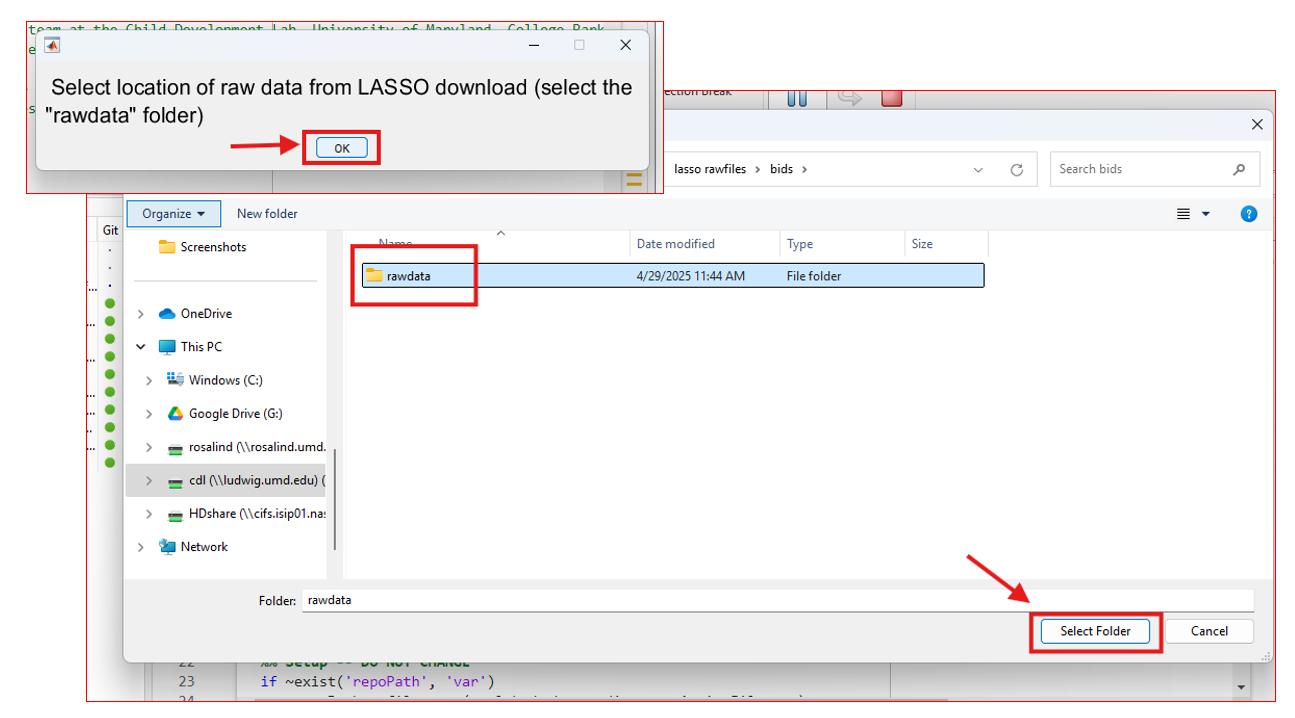
5- If prompted, select the path to where you downloaded EEGLAB.
6- Select the tasks for which you wish to compute derivatives.

7- Wait for the script to finish. This could take up to 2 hours if processing all tasks for all release subjects.
8- Find derivative output in the following folders:
|__ made/
    |__ sub-<label>/ #subject-level output
    |__ Concatenated outputs for ERPs/ #concatenated output
See Descriptions of output for details.